kintone is a cloud-based application platform for businesses that lets you create and customize business apps easily and flexibly. Thanks to its ease of use and rich feature set, even non-developers can optimize business processes efficiently.
This article explains kintone's key features, how it is used in practice, and what kintone is not so good at. It is a useful read for anyone who wants to improve business processes effectively with kintone or learn how to build business apps efficiently.
What you will learn in this article
- kintone's key features and functions
- What kintone can and cannot do
- Examples of work that kintone can streamline
Who this article is for
- Those who want to improve business processes effectively
- Those looking for scenarios where kintone can be put to good use
What is kintone?
Build business apps easily, with no programming knowledge
kintone is a cloud service for businesses provided by Cybozu. It is a platform that makes it easy to develop and customize business applications.
Conventional system development tends to require specialized expertise, high development costs, and a great deal of time for design and development.
However, kintone's greatest strength is that you can build business apps easily without advanced programming knowledge. With simple operations such as importing Excel or CSV files and drag-and-drop, you can create databases and business apps intuitively and with little effort (in other words, no-code development).
In kintone, an “app” is “a business system that you can add to the ‘kintone box’ for every job you have.” *Quoted from the kintone website
In other words, for work such as customer and deal management, travel expense requests, sales management, daily reports, and project management, kintone is a business system to which you can add a system tailored to each job, as many as you have jobs.
Many app templates are available as sample apps. You can use them as they are, or change their design and settings to suit your needs.
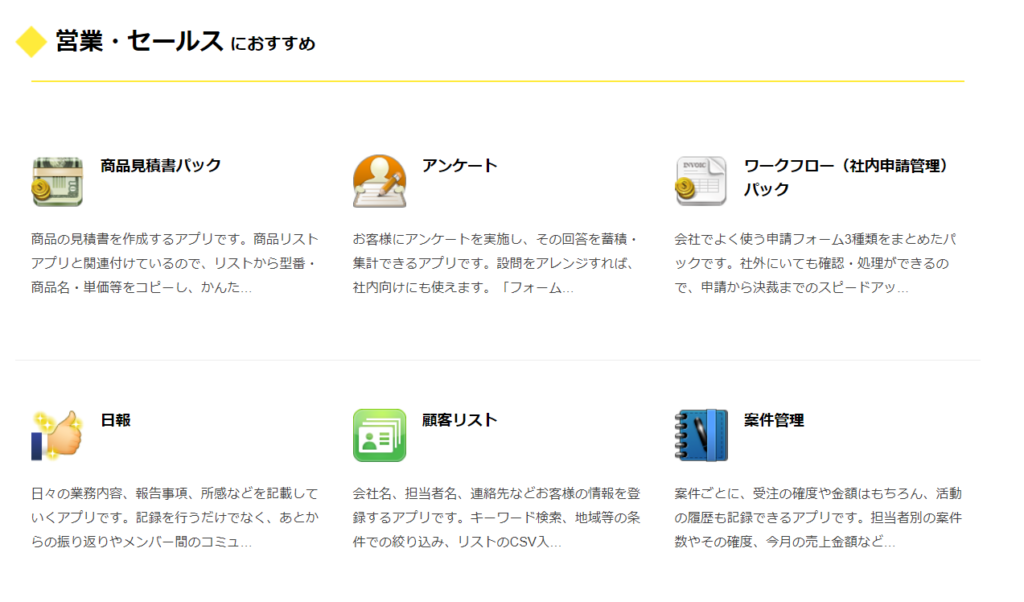
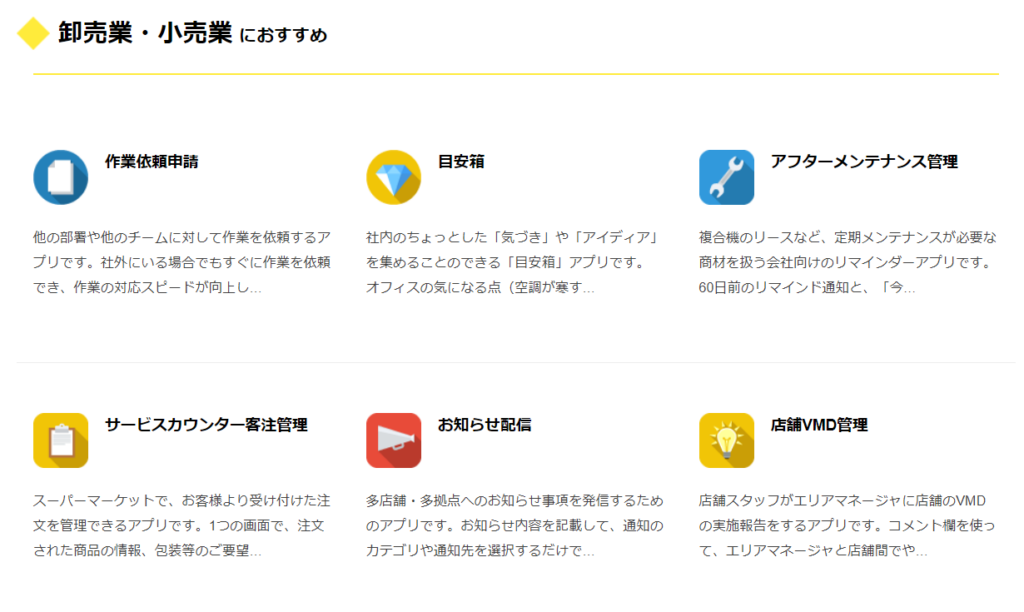
→ See more sample apps on the official kintone website
kintone's strengths: what it can do
kintone apps come with database functions for storing, listing, and searching data, as well as communication functions that help work run smoothly.
With kintone, companies can build fast, efficient business processes and improve collaboration across the entire team.
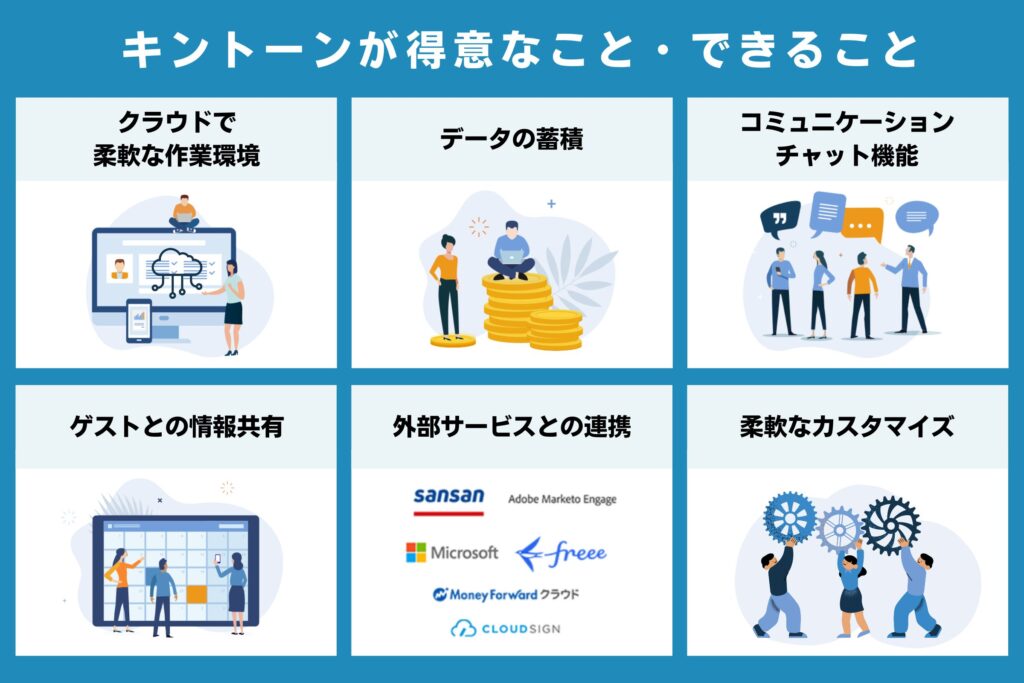
Real-time data sharing
Because kintone is a cloud service used over the internet, it provides a flexible working environment that does not depend on location or device.
Real-time data sharing is built in: multiple users can view and edit data at the same time, so information is shared as it happens.

Data storage
You can accumulate data in apps, managing everything from text to file attachments in a unified format.
Data stored in apps can be searched not only by its text but also by the contents of attached files. You can filter by conditions to change what is shown in list views, and aggregate data into charts.

Communication and chat features
kintone has a feature called “Spaces,” where members can hold discussions and share information as a team. You can also start threads based on agenda items or themes.
kintone can also be used to manage the information, documents, to-dos, and other items needed for communication within a space, as “apps within the space.”

Sharing information with guests
With guest spaces, you can invite people who are not kintone users at your company, such as customers, business partners, and contractors, to share information.
Invited guest users can view and post in threads and use apps, but only within the guest space.

Integration with external services
kintone offers a wide range of integration APIs and plugins. With these extensions, you can easily integrate with external services.
For example, you can connect with a variety of cloud services, such as business management and accounting services, to make your work even more efficient. Integration with systems you already use, such as Chatwork, freee, and LINE, is also easy.

Flexible customization
kintone can be freely customized with plugins to make it easier to use. By loading CSS files and JavaScript, you can add your own functions to kintone.

Basic aggregation and charts, ready to use
kintone has a “data aggregation” feature that summarizes the data in a kintone app and displays it as tables or charts, including cross-tabulations.
Tables and charts let you check the latest status visually at a glance and turn it into ideas for your next initiative, so you never miss a business opportunity.

Examples of how kintone is used
By taking advantage of kintone's features, you can handle many kinds of work efficiently.
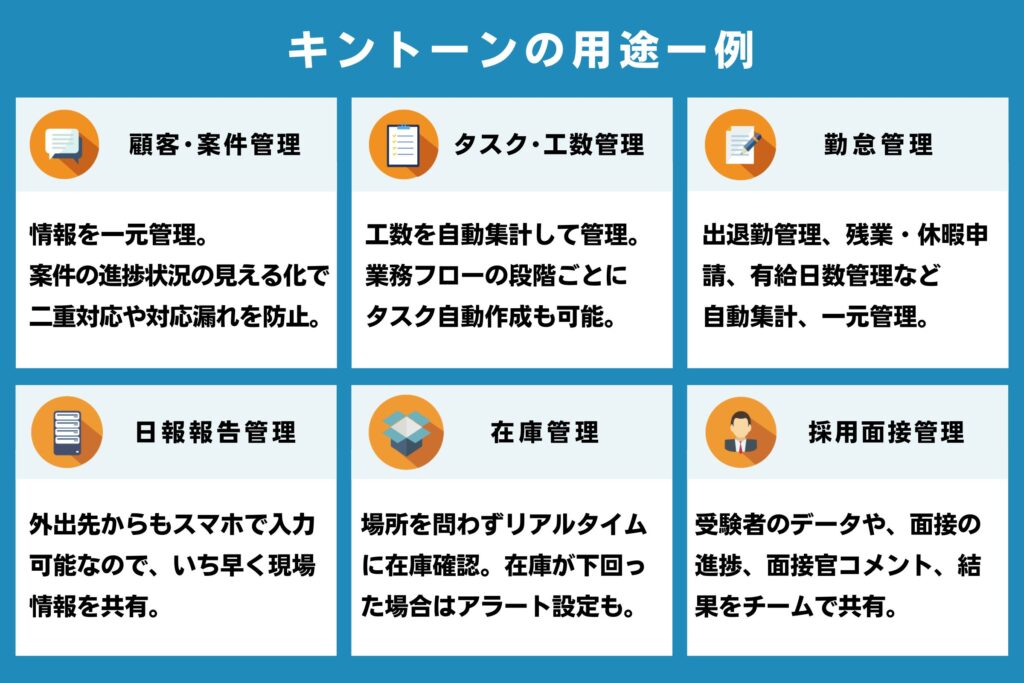
For example, as shown in the figure below, customer and deal management and attendance management are areas where kintone excels, and you can build a management system relatively easily by combining apps.
Beyond the examples shown, kintone can be used for moving away from Excel, inquiry management, remote work management, file management, internal administration, order management, surveys and research, FAQs, and more.
[Reference] kintone official site: “Use cases by purpose”
kintone's weaknesses: what it cannot do
kintone is a feature-rich business system, but it has some limitations and weak points. Here are the main ones.
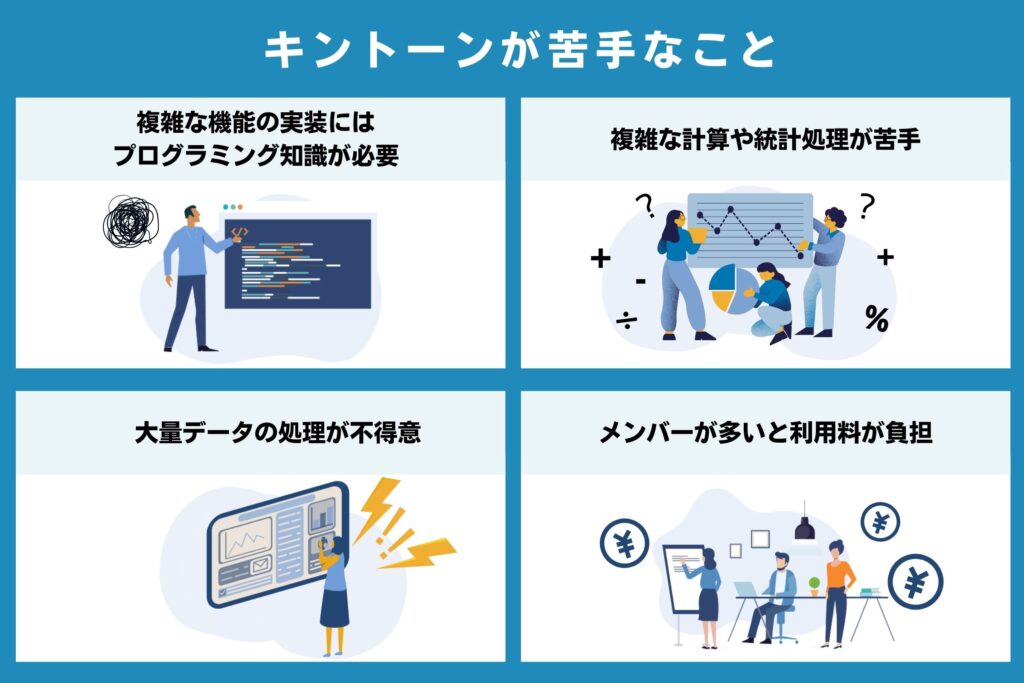
Complex functions require programming knowledge
kintone offers many practical apps, but the functions available without programming are relatively basic. Yet many companies have their own unique workflows and procedures.
To optimize company-specific workflows that existing apps alone cannot easily cover, you will need programming to fine-tune the details. For someone with no programming experience, acquiring the necessary knowledge takes time and experience, so it is not very realistic. When building a complex system, enlisting the help of experts is the effective approach.

Not suited to complex calculations or statistical processing
kintone can handle basic calculations and statistical processing, but it may not cope with complex cases. This is because kintone is specialized for building business applications and does not support advanced mathematical processing. In many cases, functions available in Excel are not supported either.
That said, plugins make it possible to perform reasonably complex calculations. However, if you need specialized analysis tied to a particular business or are focusing on specialized work, a dedicated system built for that work is a better fit.

Not good at processing large volumes of data
kintone tends to be slow when searching large volumes of data and is not good at updating large datasets. In addition, while charts are easy to create, the number of records they can cover is limited, as are the available chart types and metrics, so kintone is not well suited for use as a data analytics platform.
For an analytics platform, we recommend using tools and services designed specifically for that purpose. For simple analyses, kintone can sometimes serve as an analytics platform if intermediate aggregation is done in another tool and the results are fed into kintone.

Usage fees can become a burden when there are many members
kintone is billed monthly based on the number of users. Inviting external stakeholders as guest users also incurs fees according to the number of guest users.
If kintone is used frequently and communication is active, the benefits will likely outweigh the cost. However, in businesses with many users, monthly license fees can become a heavy burden.
[Examples of cases where a large number of users becomes a cost issue]
・Issuing accounts to every student and parent at a tutoring school or lesson business
・Issuing accounts to each customer for order management on an e-commerce site
・Issuing accounts to each of many partners, such as at an insurance agency
Solve the user-count problem with an external integration service
One way to save on kintone monthly licenses is to use an external integration service.
By introducing a service such as Kanal-WEB, which shares kintone data with external users, you can solve the cost problem caused by a growing number of kintone accounts and easily build and run a My Page (member site).
[Related article] How to build a My Page with kintone

Plugins and integration apps cover what kintone cannot do
API integrations, plugins built with JavaScript or CSS, and customization features broaden what you can do with kintone and cover its weak points.
Plugins and integration services (packaged products) are add-on programs that apply multiple JavaScript and CSS files as a single pack or service. For example, there are plugins and integration services that sync kintone with tools you already use, such as freee, Sansan, Money Forward Cloud, CloudSign, LINE, and Chatwork, so you can use them even more effectively.
Another option is to customize app behavior and screens through in-house development using JavaScript, CSS, and similar technologies.
Whether to introduce plugins or customize (develop in-house) needs careful consideration, since each has its own advantages and disadvantages, as shown in the figure below. We explain them in detail in the next section.
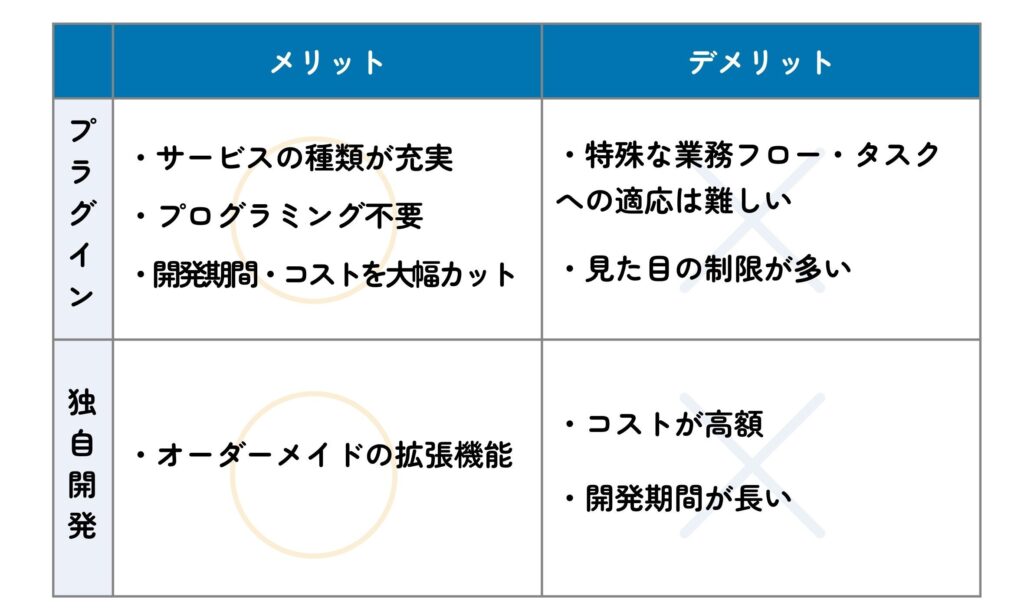
Advantages and disadvantages of integration apps and plugins
Integration services and extensions can be used as kintone plugins.
External service integrations connect kintone with a variety of existing cloud services so you can use them efficiently.
Advantages
A wide range of services: More than 200 services covering every kind of work are available, and combining them expands what you can do with kintone.
No programming required: Anyone can easily extend kintone's functions from a settings screen. *Excluding some services intended for developers
Significantly lower development time and cost: Because they are packaged, you can cut development time and costs significantly compared with developing from scratch.
Disadvantages
Hard to adapt to special workflows and tasks: Many extensions are designed to make common work more efficient, so they can be difficult to adapt to company-specific workflows or unique tasks
Many limitations on appearance: Most focus on functionality, and relatively few services offer more freedom in design
Advantages and disadvantages of customization (in-house development)
You can customize app behavior and screens through in-house development using JavaScript, CSS, and similar technologies.
Advantages
Made-to-order extensions: Customization lets you build made-to-order extensions, down to fine-grained behavior and appearance, that match your company's requirements
Disadvantages
High cost: You need to secure people with specialized knowledge. Outsourcing development is another option, but it comes at a cost
Long development time: When developing from scratch, it can take a while before the system is ready for practical use
[Reference] kintone official site: “Extensions”
What is Kanal-WEB, which lets you share kintone data externally?
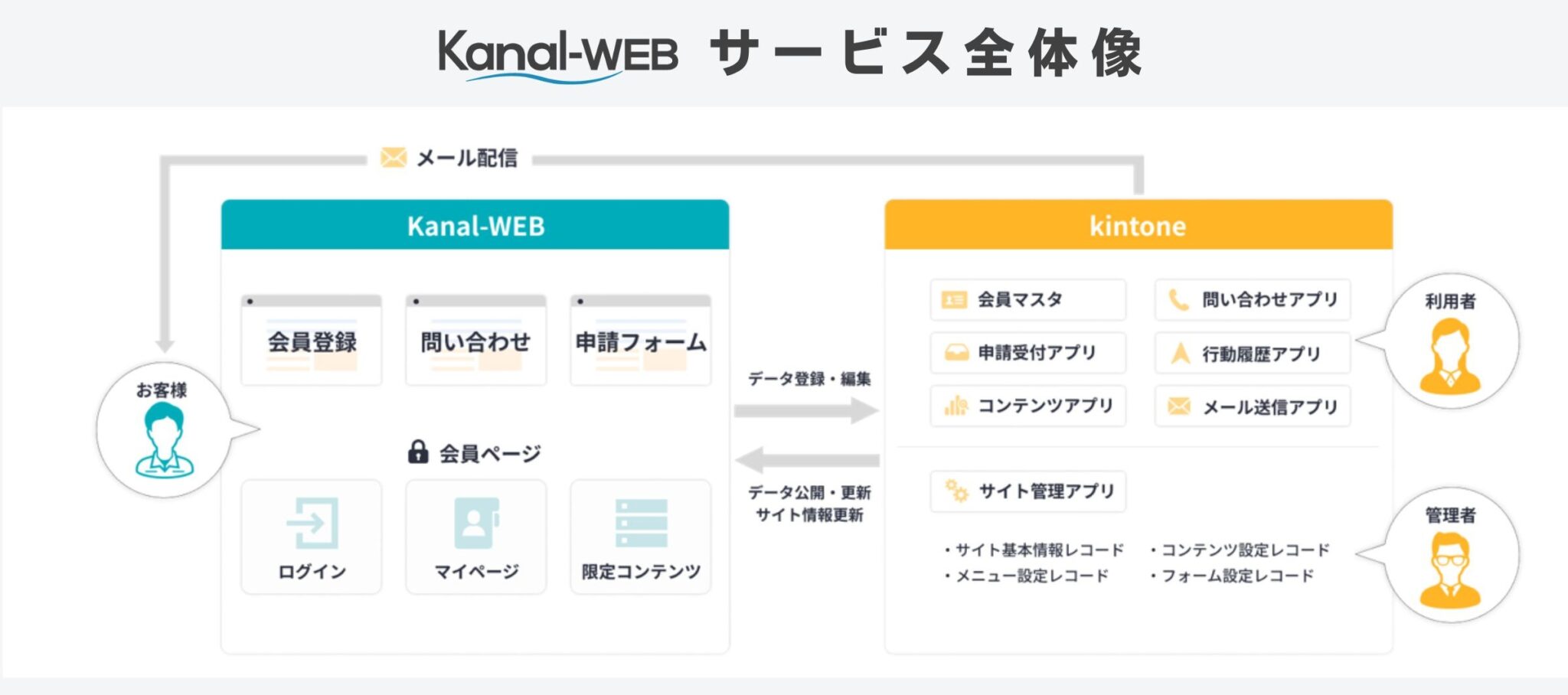
Kanal-WEB is an external integration service that connects to kintone. It solves the cost problem caused by a growing number of kintone accounts and is a service for easily building and running a My Page (member site).
kintone has no built-in system app for building a My Page. Kanal-WEB fills that gap as a plugin. Without worrying about managing member information in two places or integrating separate systems, you can add member services while making full use of the data you have already accumulated.
[Related article] How to build a My Page with kintone
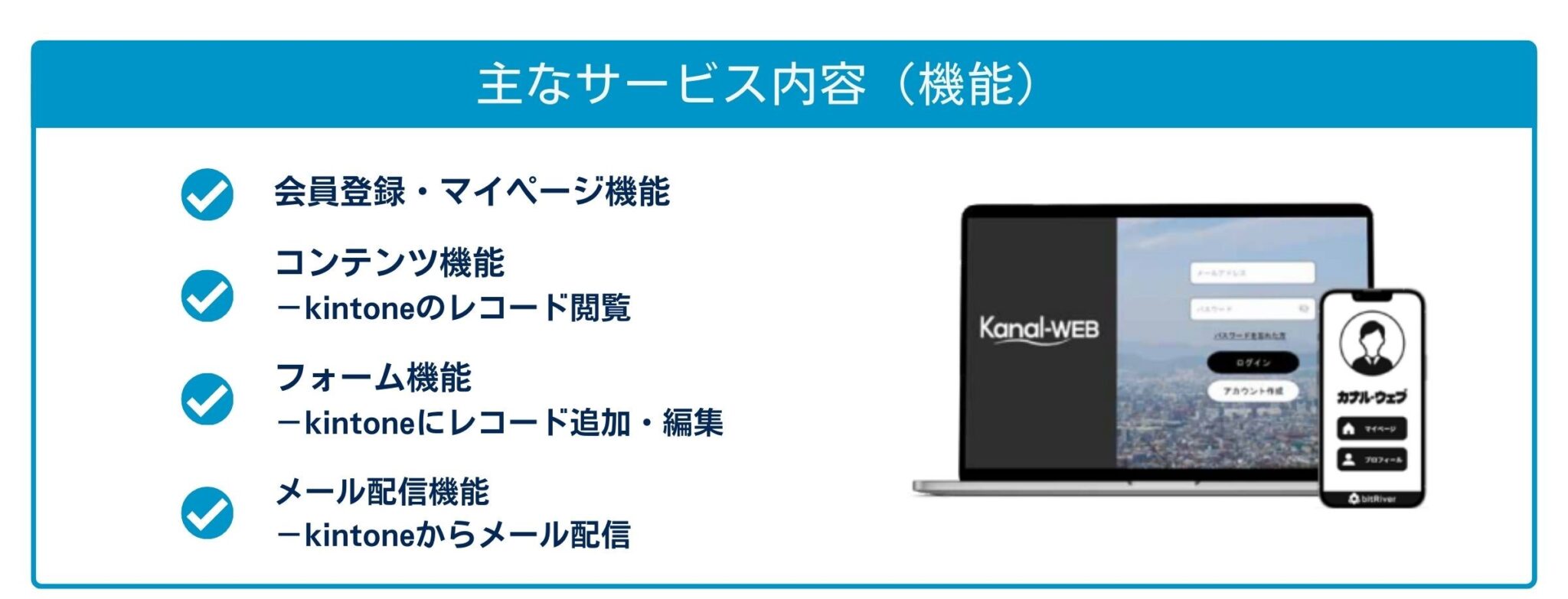
No need to issue a kintone account for each member! All data is consolidated in kintone
With Kanal-WEB, even in projects that tend to have many users, you can issue a Kanal-WEB account to each client so that clients can place orders and manage their registration details themselves.
In this setup, members do not need their own kintone accounts; only administrators are issued kintone accounts. All data is consolidated in kintone, where you can manage orders and customers.
Case study: solving the member-count challenge with Kanal-WEB

[Project] Building a platform for a public project that promotes digitalization
[Challenge] With a limited budget, it was difficult to issue kintone accounts to each of the roughly 1,000 stakeholders.
[Solution] Each stakeholder was given their own account on Kanal-WEB. The system consolidates the activity data from these accounts in kintone without requiring kintone accounts for the stakeholders. With only the secretariat holding kintone accounts, an efficient digital platform was built within budget.
▼ For details of this case, please read the following article.
Use Kanal-WEB to share kintone data with external members
If you are struggling to make use of kintone in projects with many users, or are considering an integration system for creating a My Page, please consider Kanal-WEB. We support My Page operations that start small and grow over time, beginning with what you can do today.
We also welcome a wide range of inquiries if you are wondering how kintone could be applied to your project, so please feel free to contact us.