
With Kanal-WEB, you can easily create a member My Page using your existing kintone apps. You can try it right away with a trial, so even first-time users can get started with confidence.
Steps
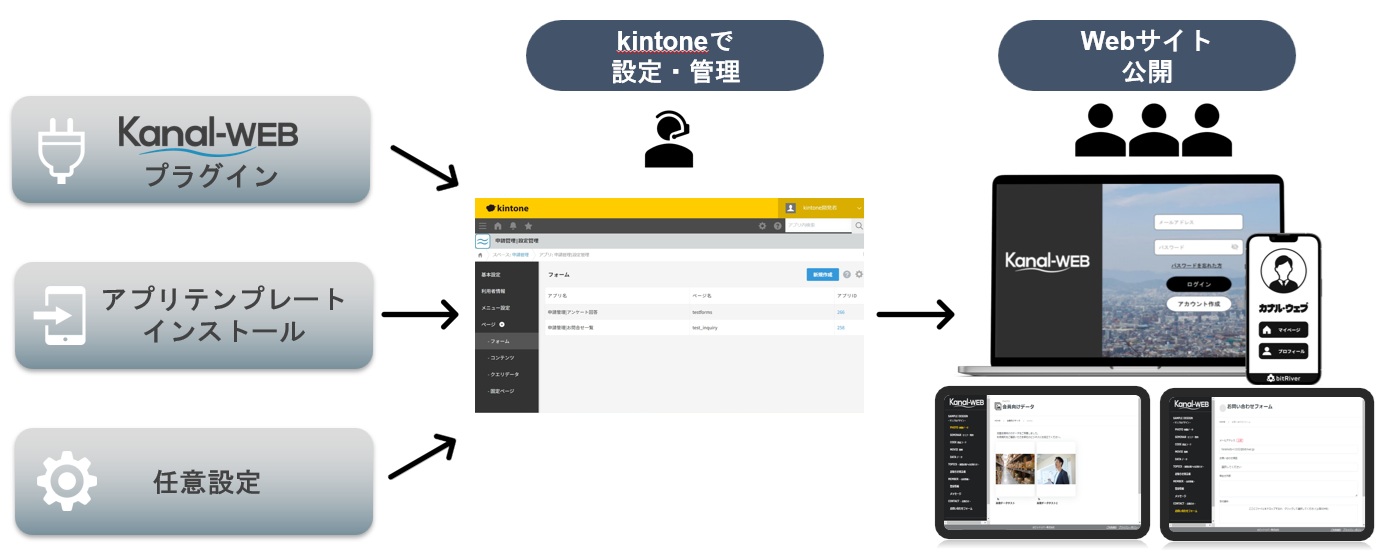
- Sign up for a free trial
- Install the plugin and the configuration app in kintone
- 💡 Tip! All settings are completed within apps in kintone
- Connect your kintone apps in the configuration app
- Set your company logo and color scheme, then publish and start operating
Additional Notes
- The member My Page lets members view and edit their information and lets you deliver exclusive content.
- Permission settings let you show different content to, for example, general users and administrators.
- Everything can be configured without code, so you can be up and running in a short time.
Related FAQs
- Can Kanal-WEB integrate with multiple kintone apps?
- Can Kanal-WEB automatically invite kintone users?
- Can Kanal-WEB integrate with LINE?