
Yes, it can.
Below is an overview of the six main features Kanal-WEB provides. We've summarized each feature's details, usage constraints, and example uses in an easy-to-follow format.
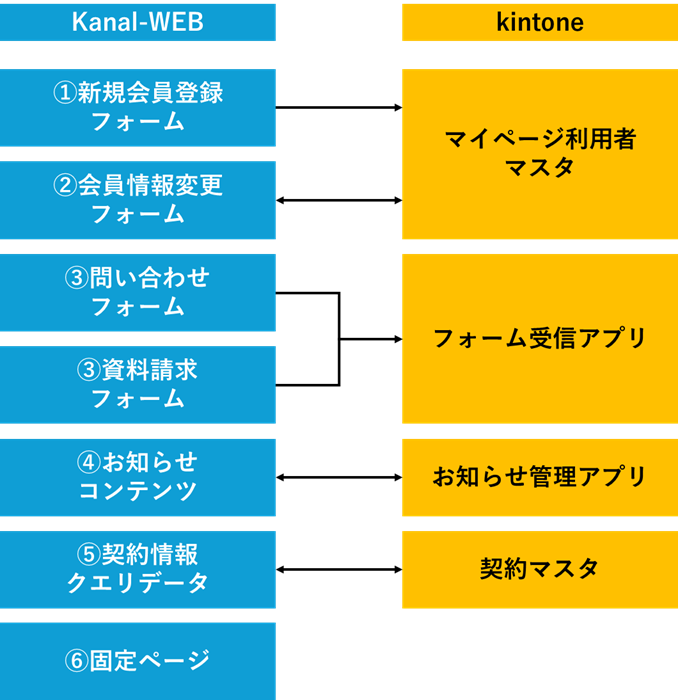
① New Member Registration Form
- Create member registration forms for external users that integrate with kintone
- After registration, login invitation emails can be sent from the My Page user master
- Registration data is saved directly to the kintone My Page user master
- Only one can be configured per domain
- Example: Sending automatic emails to new registrants reduces manual work for administrators
② Member Information Update Form
- Logged-in users can view and edit their own information
- Changes overwrite the existing record
- Each field can be set to “view only” or “editable”
- Only one can be configured per domain
- Example: Changes to addresses, phone numbers, and other details are automatically updated in sync with the kintone database
③ Forms
- Create web forms for inquiries, applications, surveys, and more
- Multiple forms can be registered to a single kintone app
- Input from one form cannot be registered to multiple kintone apps
- Various settings are available, including file attachments, auto-reply emails, drafts, and thank-you screens
- Example: Enabling file attachments on an application form streamlines document management
④ Content
- Publish announcements and product pages to all users or specific groups
- Can be configured for adding and editing records, not just viewing
- Only one can be configured per app
- *Cannot be configured for apps that already have other settings, such as forms or query data
- Example: Automatically publish internal announcements, FAQs, and product information pages in sync with kintone
⑤ Query Data
- Logged-in users can view only the data related to them
- Can be configured for adding and editing records, not just viewing
- Only one can be configured per app
- *Cannot be configured for apps that already have other settings, such as forms or content
- Example: Securely display and update individual data such as application or purchase history
⑥ Static Pages
- Create free-layout pages that aren't linked to a kintone app
- Fully customizable with HTML
- Useful for user manuals, static help, pages introducing external services, and more
- Example: Flexibly design internal procedure guides and user help pages in HTML