
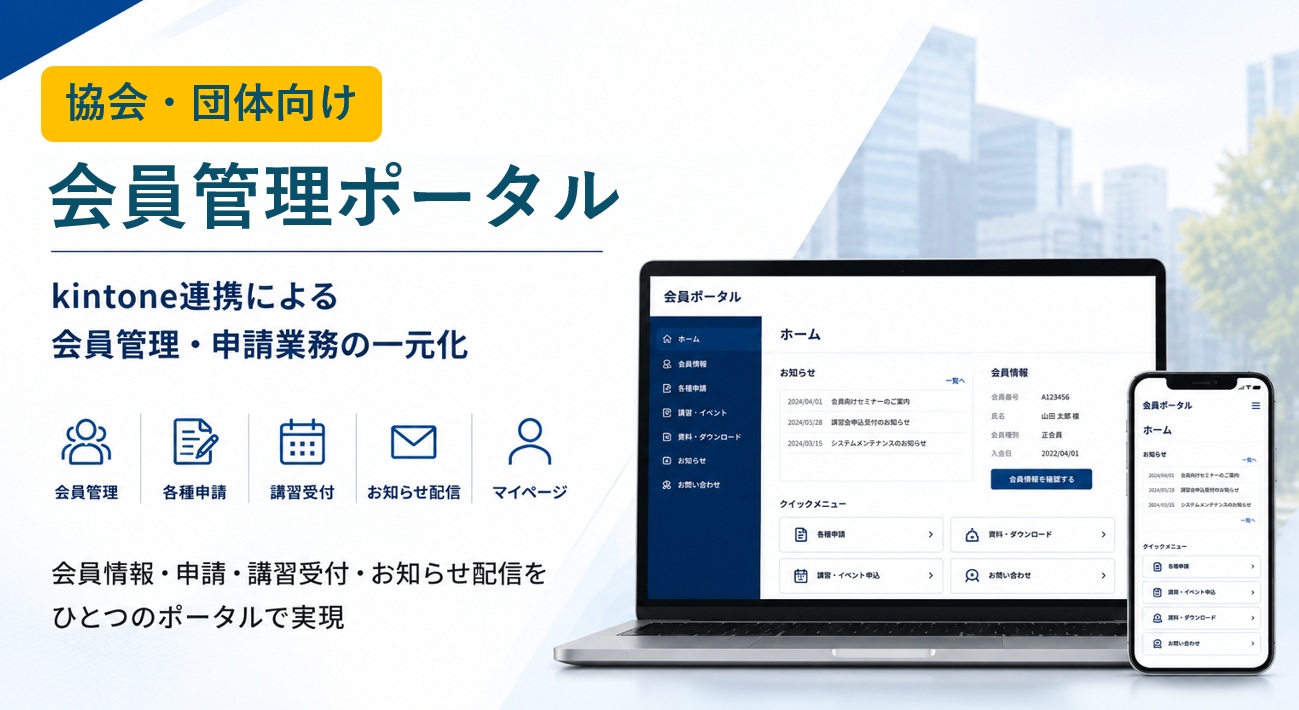
This member portal model can be deployed in a short time, with a configuration that associations and organizations can use as is.
Is This How Your Association Operates Today?
- Member information is scattered across Excel files and existing systems
- Course registrations and other applications are handled separately by phone, email, and paper
As a result:
- Application details are transcribed by hand and matched to member records
- Transcription errors and missed updates occur
- Work piles up on certain staff members, and operations come to depend on specific individuals
The Solution: Centralizing Everything with kintone × Kanal-WEB
By consolidating scattered member information in kintone and combining it with a member portal, you can bring applications, courses, and information sharing together in one place.
This lets you handle everything from member services to data management entirely on the portal.
Strengths of this configuration
- Centralized information management with kintone as the data platform
- Applications, courses, and information sharing consolidated in a member portal
- Quick to deploy thanks to a standard configuration
- Easy to roll out to other associations and organizations
This article introduces a configuration that integrates kintone with Kanal-WEB, a member portal, to unify member management and member services.
Architecture Diagram
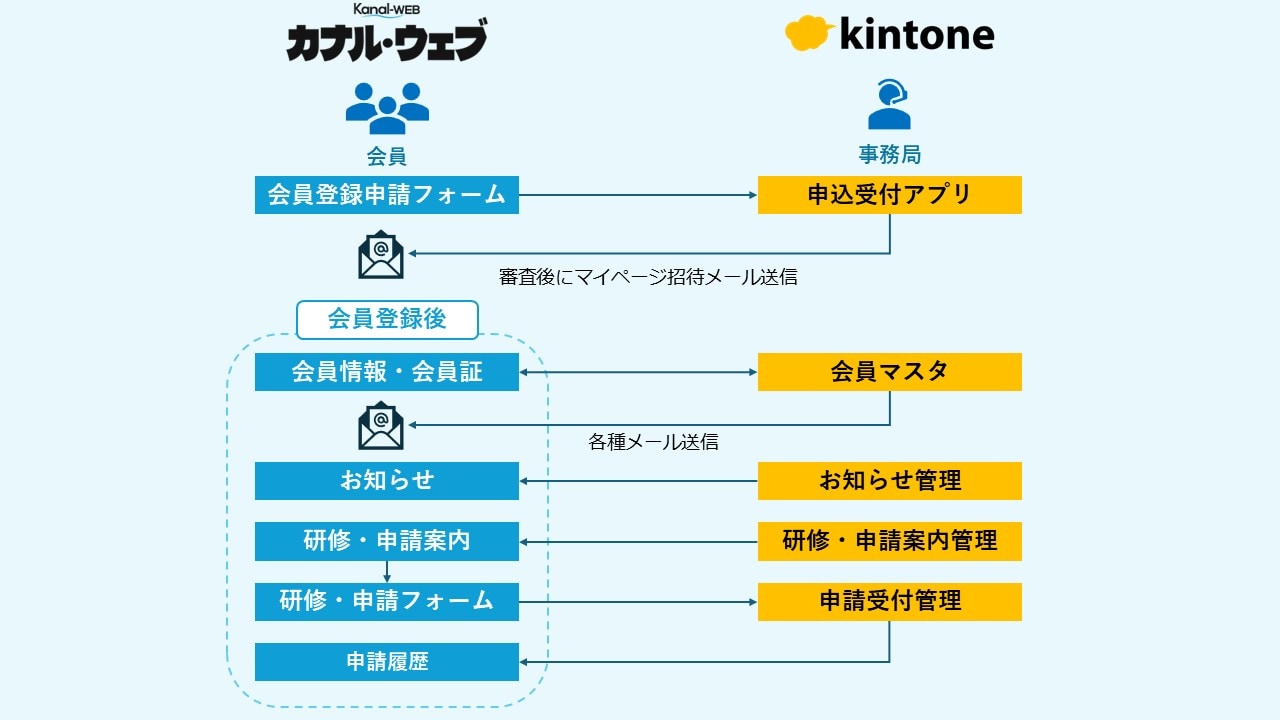
- Members log in to the portal
- They update their information, register for events, and complete various procedures
- Entries are automatically reflected in kintone
- Emails are sent based on kintone data
In this configuration, the front end (the portal) and the back end (kintone) work together.
See It in Action on the Actual Screens
Try every feature free for 30 days.
Key Features
Viewing and editing member information
Members can check and update their own information on the portal.
This reduces manual work for the secretariat.
- Supports downloading membership cards and other documents
- Members can check and update the information they need at any time
This reduces paper-based work and makes things more convenient.
Login authentication and security
- Members-only access through login authentication (ID and password)
- Optional two-factor authentication via email or SMS
The system can be designed to meet the security requirements of each association or organization.
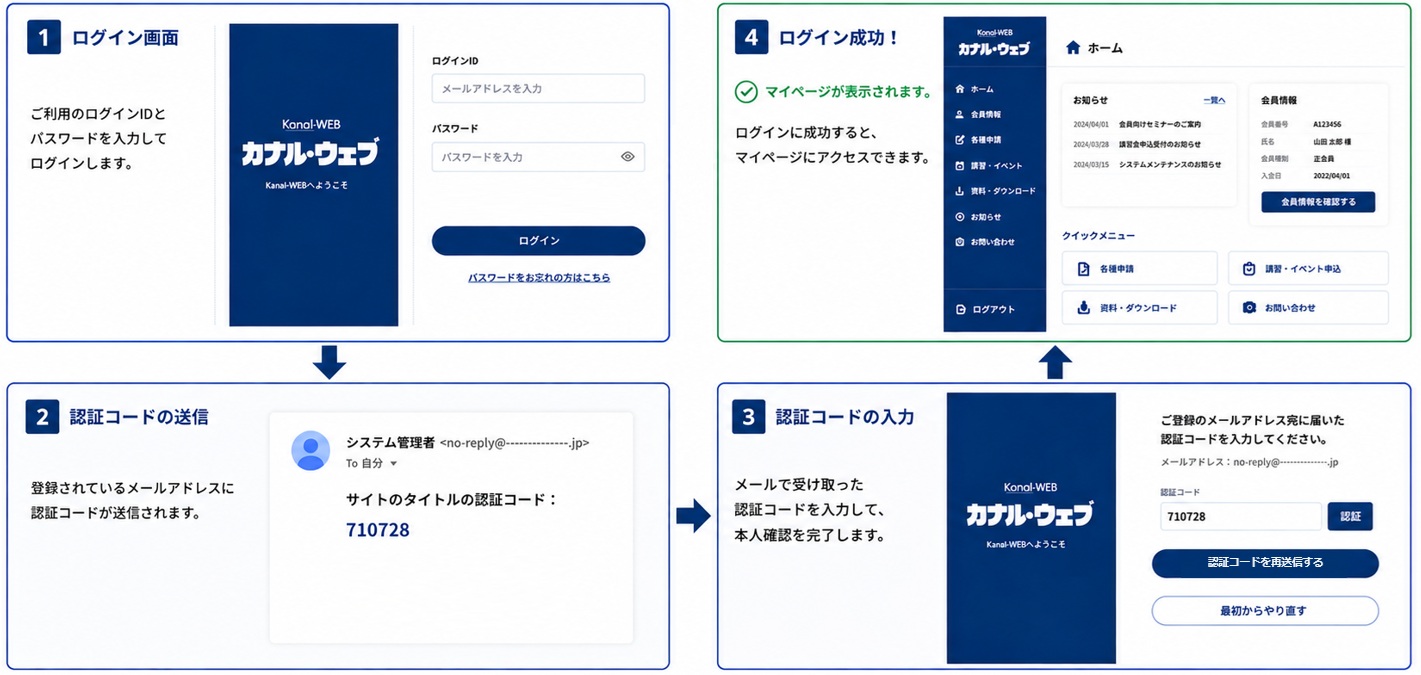
Option: Two-factor authentication via email/SMS
Web forms
Accept training registrations and other applications on the portal, with entries automatically synced to kintone.
Everything is linked to member information and managed in one place.
- Freely create training registration and application forms
- Entries are automatically synced to kintone
- Linked to member information and managed in one place
- Unlimited number of forms
This streamlines the entire process, from receiving applications to managing them.
Key web form features
- Input validation (character types, length limits, and more)
- Address autofill
- Automatic reply emails
- Saving drafts and partially completed forms
Viewing (viewer) and downloads
Display kintone data directly on the portal.
Each member can view and download the information relevant to them.
- Show different content by attribute or group
- Control permissions, such as showing members only their own records
- Combine viewing with editing
- Supports downloading materials, business forms, and other data
Deliver the information people need only to the people who need it, reducing inquiries and streamlining operations.
Email delivery
Email delivery from kintone is also included as standard, including:
- Announcements
- Event registration confirmations
- Reminders
Using your kintone data, you can send these and other emails directly from kintone.
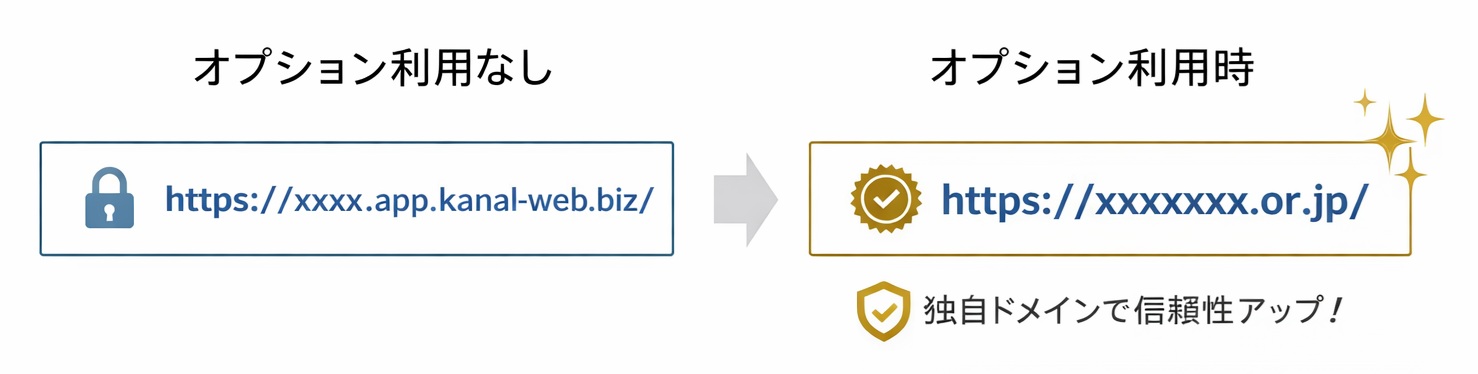
Custom domain support (greater credibility)
The portal can run on your own domain.
This helps strengthen your association's credibility and gives members an environment they can use with confidence.
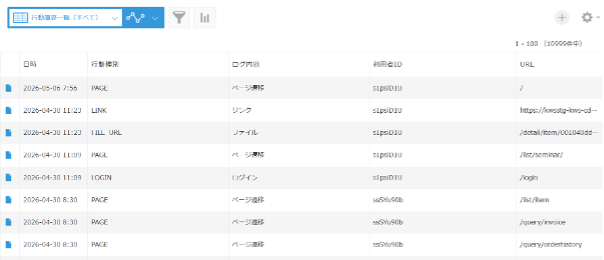
Activity history tracking and visualization
Browsing and activity history on the member site is recorded automatically.
You can see who used which page and when, all in a single list.
- See logins and how announcements are being read
- See which documents are being downloaded
- Analyze how often content is used
Use these insights to identify members who need follow-up and to improve your communications, enabling data-driven operations.
Combining this with kintone AI lets you take the analysis and use of activity data even further.
Why It Can Be Built Quickly
Rather than being custom-developed from scratch, this configuration is designed as a general-purpose model that combines kintone with portal features.
This means:
- Core features such as member management, applications, and announcements are already organized
- Configuration patterns are standardized
- Features can be combined and adjusted individually
These characteristics make it possible to build the portal in a short time.
Benefits
Centralized data management
Scattered member information is consolidated in kintone and managed in one place.
Greater operational efficiency
Less manual transcription and checking eases the operational workload.
Fewer human errors
Standardized input and update processes help prevent mistakes.
Better member experience
Members can complete procedures entirely on the portal, which makes things more convenient for them.
Easy to Roll Out to Other Organizations (for SI Partners)
This configuration is a general-purpose model that does not depend on any particular association.
Example deployments:
- Industry associations
- Commerce and industry organizations
- Academic societies and study groups
- Regional organizations
- Membership-based communities
Because it can be adjusted feature by feature, it can also be used as a proposal template or a package.
Summary
By consolidating data in kintone and connecting Kanal-WEB as a member portal, you can unify member management and member services instead of keeping them separate.
The result:
- Greater operational efficiency
- Fewer errors
- More convenience for members
All of these can be achieved at the same time.
What's more, its general-purpose configuration makes it an effective model for associations and membership organizations, combining quick deployment with easy rollout to other organizations.
Related Articles
See It in Action on the Actual Screens
Try every feature free for 30 days.