

An implementation pattern for building an application portal with kintone and Kanal-WEB
Overview
Subsidy applications and other application processes often call for systems like the following:
- Application intake form
- My Page for applicants
- Registration of application information
- Review status checks
- Resubmission when there are deficiencies
However, kintone implementation projects also commonly run into challenges like these:
- Managing user accounts is a heavy burden
- Per-user licensing fees become expensive on projects with many applicants
- Building login and My Page features takes significant effort
- On projects with tight deadlines, there is no bandwidth left for front-end development
In cases like these, combining kintone with Kanal-WEB lets you build an application management system efficiently.
This article presents an example configuration of an application management system built with Kanal-WEB.
System Overview
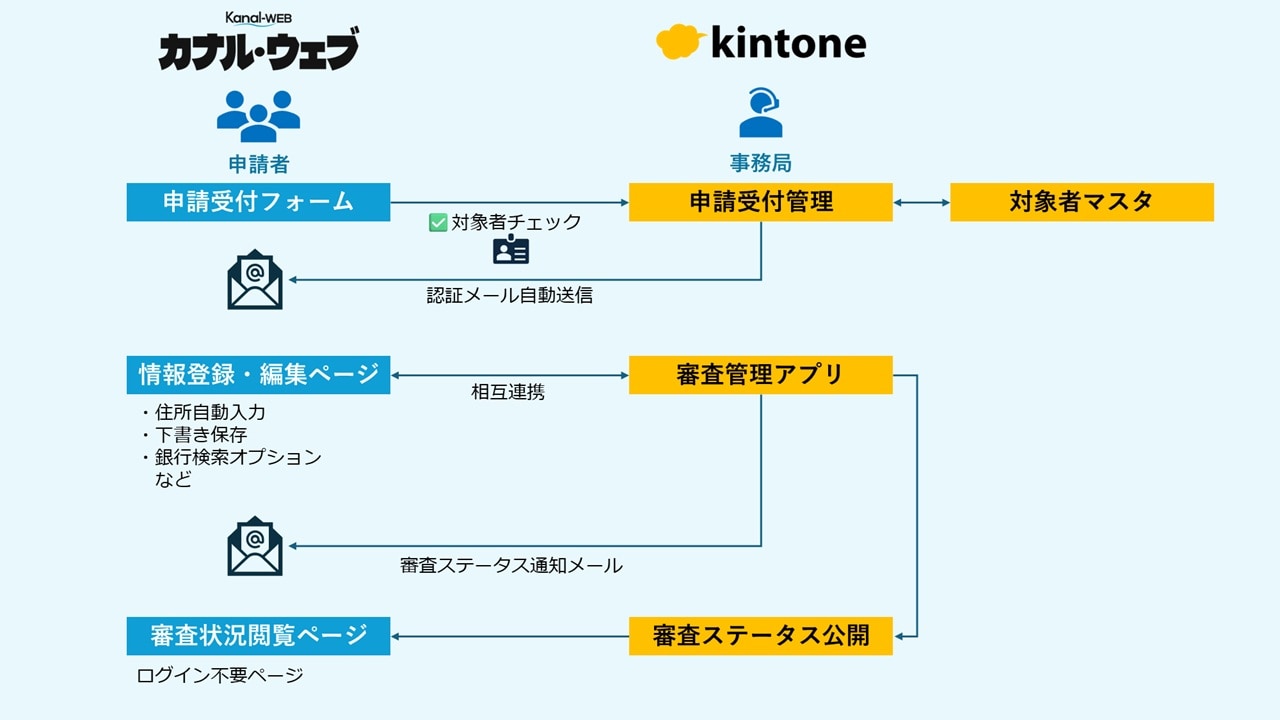
The system divides responsibilities as follows:
kintone
- Application data management
- Review status management
- Review work
Kanal-WEB
- Application intake form
- User authentication
- My Page
- Application registration form
- Status publishing
The Basic Application Management Flow
Application Intake Form + Eligibility Check
The application intake form registers information about prospective applicants.
By using the eligibility check feature at this stage, you can, for example:
- Accept applications only from eligible people
- Allow only users who meet the conditions to proceed to the next step
These and similar controls are all available.
You can also automatically send a My Page invitation email to users who pass the eligibility check.
This eliminates the need to issue and manage user accounts manually.
Registering Application Information from My Page
When users log in via the invitation email, they are taken to their own dedicated My Page.
From there, they can register their application information.
Input Assistance Features in Application Forms
Kanal-WEB application forms offer a range of features that reduce the input burden on users.
Automatic Address Entry from Postal Codes
When a postal code is entered, the address is filled in automatically. This reduces input errors and helps applications go smoothly.
Bank Lookup Option
For entering bank information, you can use the bank lookup option.
Its key features are as follows:
- No bank master needed in kintone
- Displays candidate banks based on partial keyword matches
- Displays the relevant branch candidates once a bank is selected
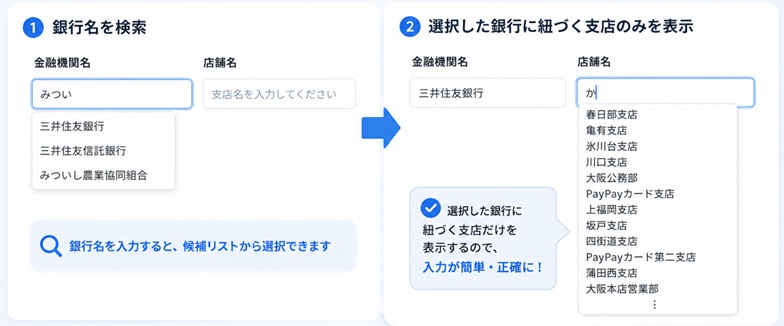
Because there is no need to maintain a financial institution master, the burden of building and operating the system is reduced.
Flexible Validation Settings
Forms support a wide variety of input checks.
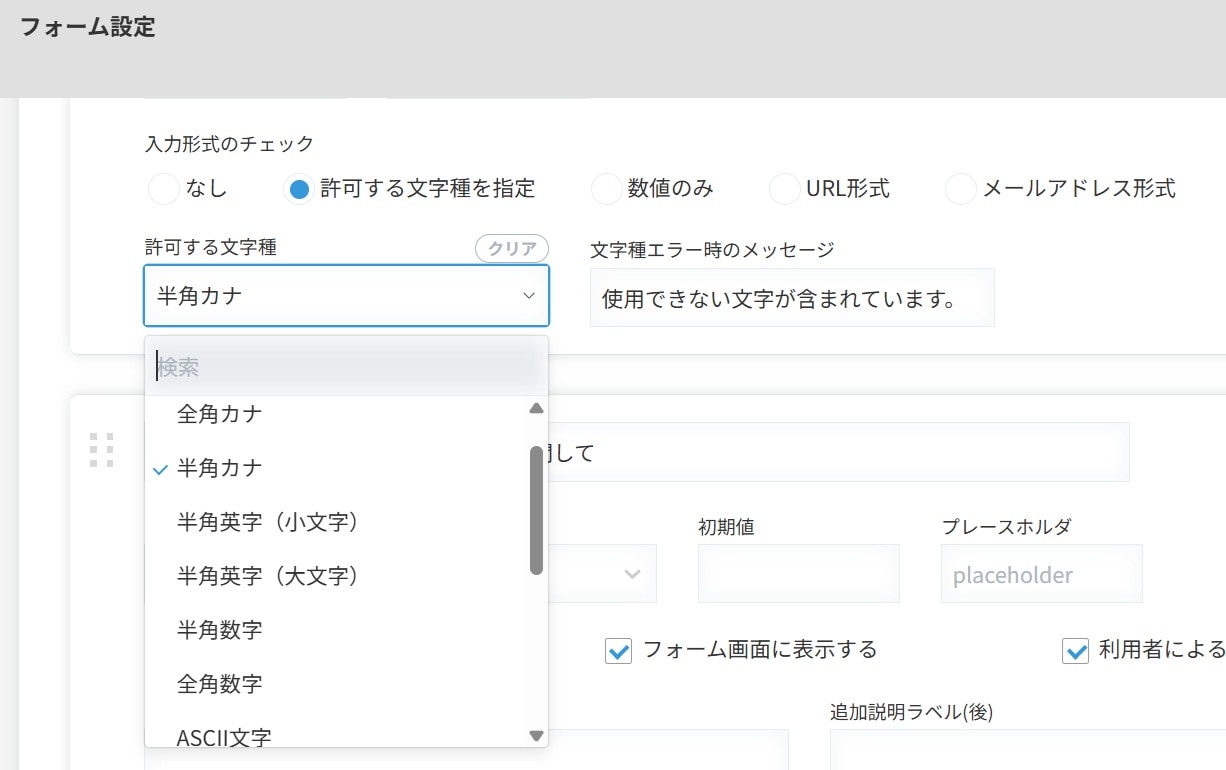
For example, you can configure the following:
- Postal code and half-width katakana checks
- Numeric input checks
- Digit count checks
- Required field checks
This makes it possible to collect application data with fewer input errors and omissions.
Review Status Notifications
Application data is managed in kintone, and applicants can be notified according to their review status.
For example, you can send notifications such as:
- Under review
- Incomplete
- Approved
- Returned for revision
Applicants can check their own review status by logging in to My Page.
Support for Corrections and Resubmissions
If there are deficiencies, applicants can log in to My Page to:
- Review their application
- Correct the details
- Resubmit
This cuts down on back-and-forth by email and phone and makes the application process more efficient.
Status Page with No Login Required
For applicants who do not create an account, you can also provide a status page that requires no login.
Applicants can check their review status by entering details such as their application number.
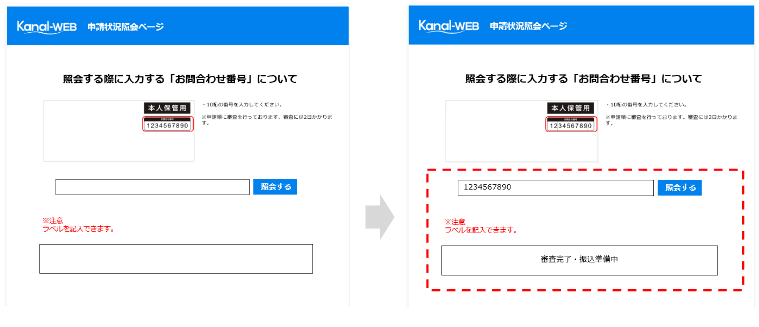
Other Features
You can build a system tailored to your specific needs.
Basic features
My Page login authentication, file attachments and downloads, form drafts, automatic reply emails, content viewing, activity history
Options
SMS and email two-factor authentication, custom domain connection, initial password management
Summary
Combining kintone with Kanal-WEB lets you build application management systems efficiently.
It is especially effective for projects such as:
- Building an application system with a My Page
- Application systems with a large number of users
- Projects that must be delivered on a tight timeline
With Kanal-WEB, there is no need to develop login or form features individually, so you can build application systems quickly.
Try It Out on the Actual Screens
Try every feature free for 30 days.