
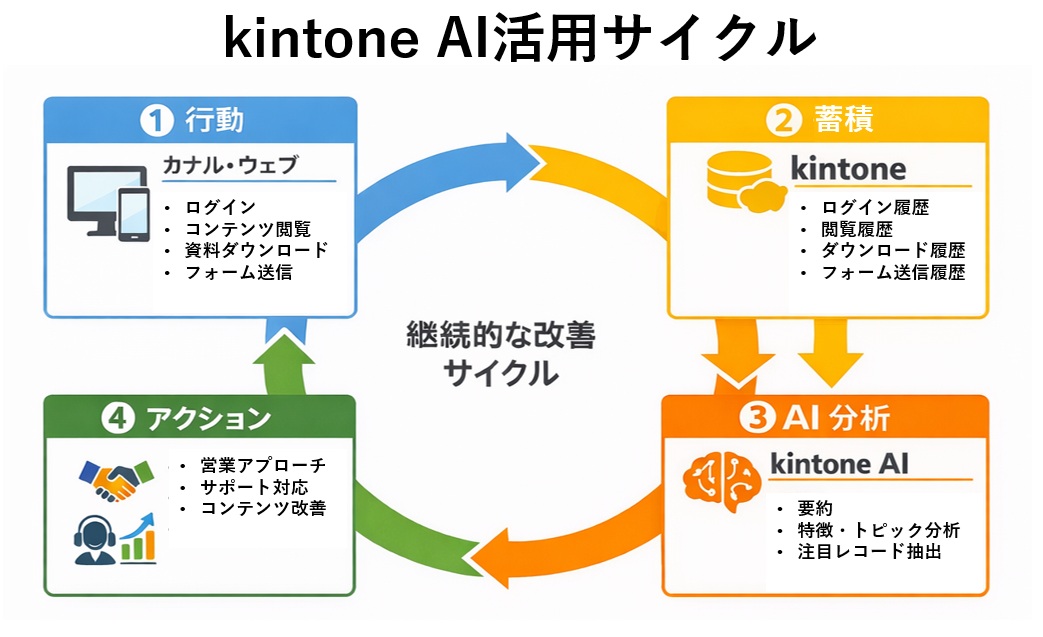
Image caption: Accumulate behavior history, analyze it with AI, and turn the insights into action
This article explains how to use kintone AI together with the behavior history of Kanal-WEB, a website that integrates with kintone, to run an improvement cycle of "behavior → accumulation → AI analysis → action."
These tips are for anyone who wants to analyze customers with kintone alone, without introducing marketing automation (MA) or sales force automation (SFA) tools.
What Is kintone AI?
kintone AI currently offers several features, including Search AI and App Creation AI. In this article, we use Record List Analysis AI, which specializes in data analysis.
Record List Analysis AI analyzes, summarizes, and offers suggestions based on the record data stored in kintone, all through an AI chat interface.
Key features
[Current operation]
- Generates analyses and reports from record data
- Suggests the next actions to take
- Enables analysis without specialized knowledge
- Organizes accumulated data into a form that is easy to use in day-to-day work
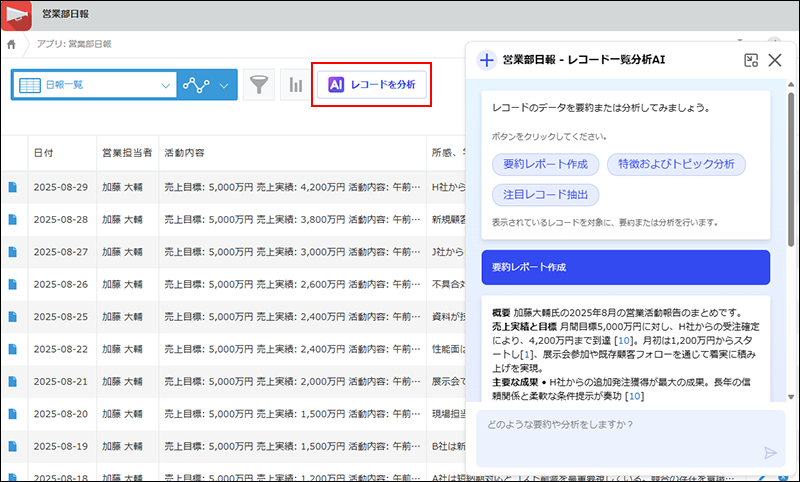
Source: https://jp.kintone.help/k/ja/id/0401039
The key point is that simply accumulating data in kintone lets you put AI analysis to work right away.
Architecture: A Simple Foundation for Consolidating Behavior History
User behavior on the website is automatically registered in a kintone behavior history app.
Records are registered for each behavior type and managed centrally in a single app.
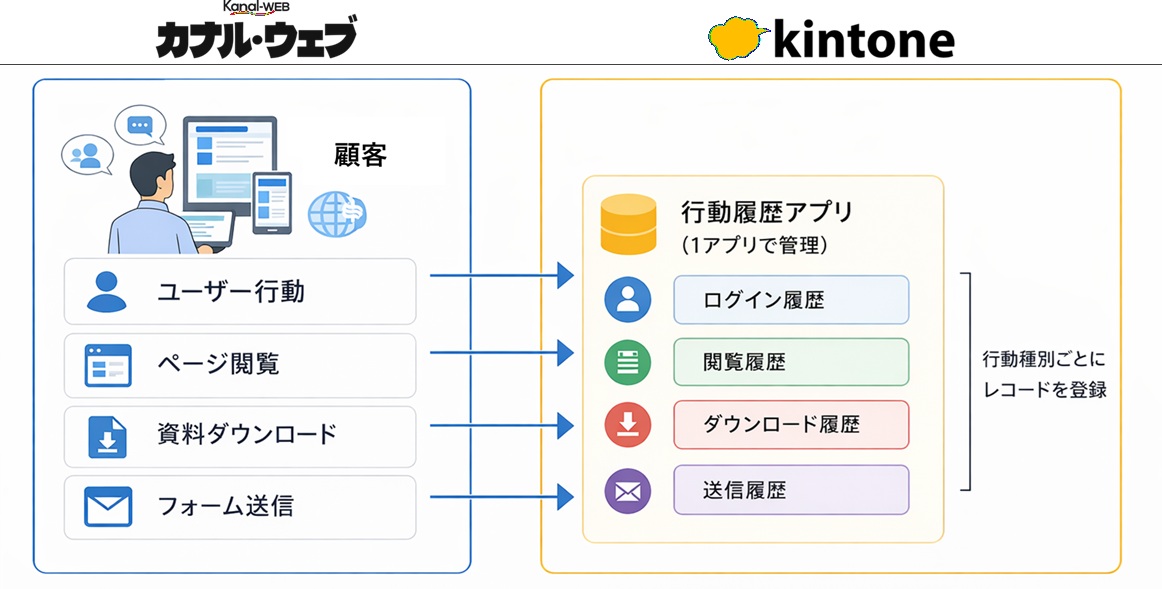
- Capture behavior history with Kanal-WEB
- Accumulate the data in kintone
- Analyze it with Record List Analysis AI
The key points of this architecture are as follows:
- Data is consolidated in kintone
- Data use can be expanded later
These two points are at the core of this setup.
Tip 1 – Better Support: Summarize the Background of Inquiries
Common challenges
- You don't know the background of an inquiry
- You don't know what the user looked at before getting in touch
How to use it
In the kintone behavior history app, filter the data using the following conditions:
- Behavior type "PAGE" (page view history)
- Users who submitted an inquiry
Pass the extracted record list directly to the AI to summarize and analyze it.
Example of an AI summary and analysis
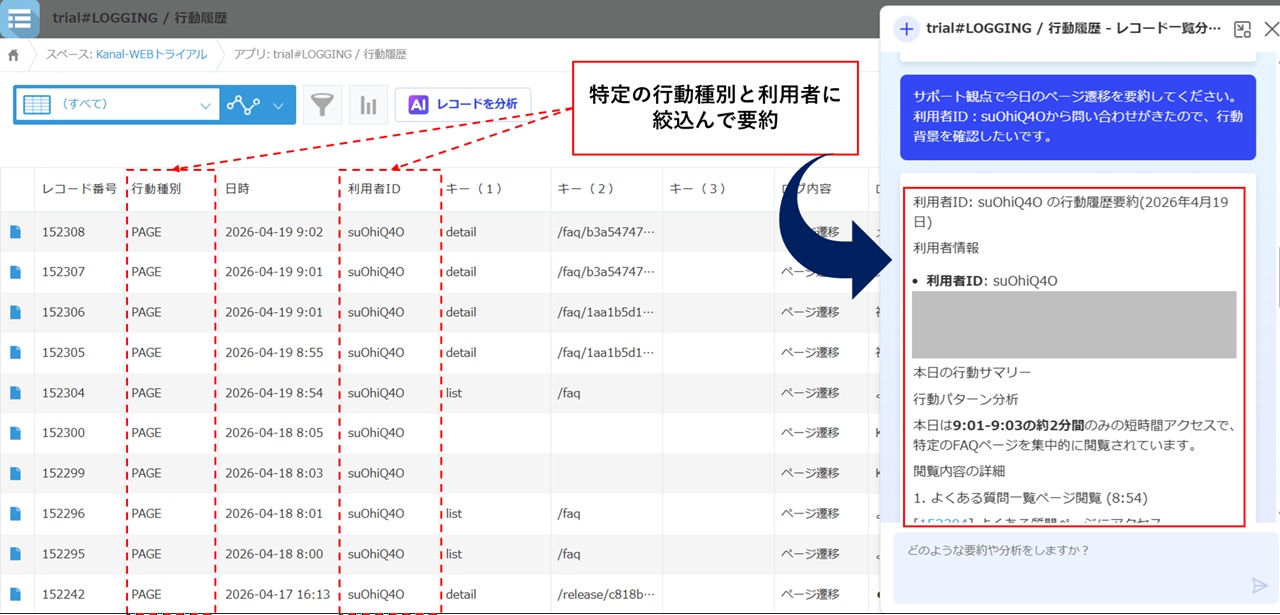
Based on the behavior history, the AI provides insights such as:
- Behavior patterns just before the inquiry
- A chronological overview and summary of the pages viewed
Benefits
- Instantly understand the background of an inquiry
- Respond faster at the first contact
- Provide answers that take the background into account
There is no longer any need to switch back and forth between screens to trace the history, which reduces investigation effort and oversights.
As a result, you can improve both the speed and quality of your responses while avoiding reliance on specific individuals.
Most importantly, you can see what the user looked at before getting in touch. This makes a major difference to the quality of your response.
Try It on the Actual Screens
Try all features free for 30 days.
Tip 2 – Sales: Identify the Right Timing for Sales from Behavior History
Common challenges
- You don't know when to approach prospects
- You can't tell which customers are interested
- Decisions depend on intuition and experience
As a result
- Outreach gets no response
- Customers who should be prioritized are put off
- Content and campaigns are not leveraged in sales
How to use it
Have the AI identify "users worth focusing on" based on the behavior history accumulated in kintone. For example, enter a prompt like the following:
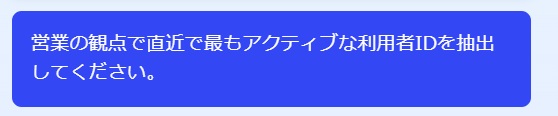
Based on data such as the number of actions and viewing patterns, the AI identifies users with a high priority for sales outreach and presents them along with its reasoning.
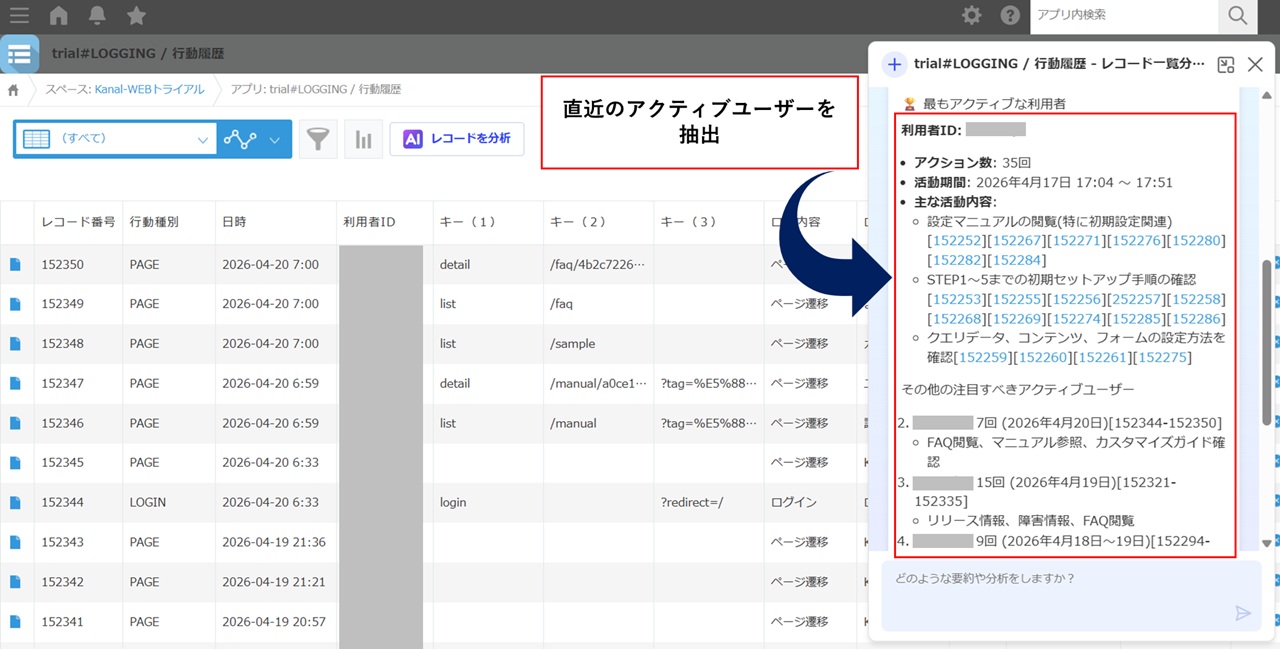
Key point
What matters is narrowing down the records to analyze appropriately before designing your prompt.
- Limit the target users
- Focus on views of specific content
- Include document download history
Adding conditions like these produces more accurate insights.
For example:
What matters is narrowing down the records to analyze appropriately before designing your prompt.
- Limit the target users
- Focus on views of specific content
- Include document download history
Adding conditions like these produces more accurate insights.
Expanding the possibilities
By refining your prompts, you can apply this to many kinds of analysis.
For example:
- Identifying users who are likely to enter the evaluation phase
- Grouping users with strong interest in specific topics
- Ranking users by outreach priority
These and other analyses can be applied flexibly to suit your goals.
Depending on how you design your prompts, you can put the behavior data accumulated in kintone to work in sales decisions. As a result, you can use data to determine which customers to approach right now.
Tip 3 – Marketing: Visualize Content Interest and Areas for Improvement from Behavior History
Common challenges
- Campaigns rely on intuition, experience, and preconceptions
- Improvements are not based on data
As a result, efforts do not lead to effective improvements.
How to use it
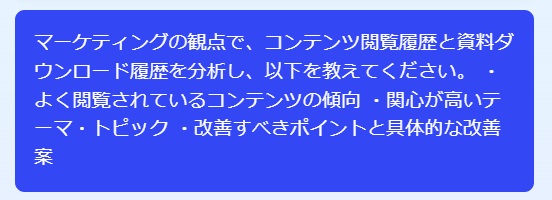
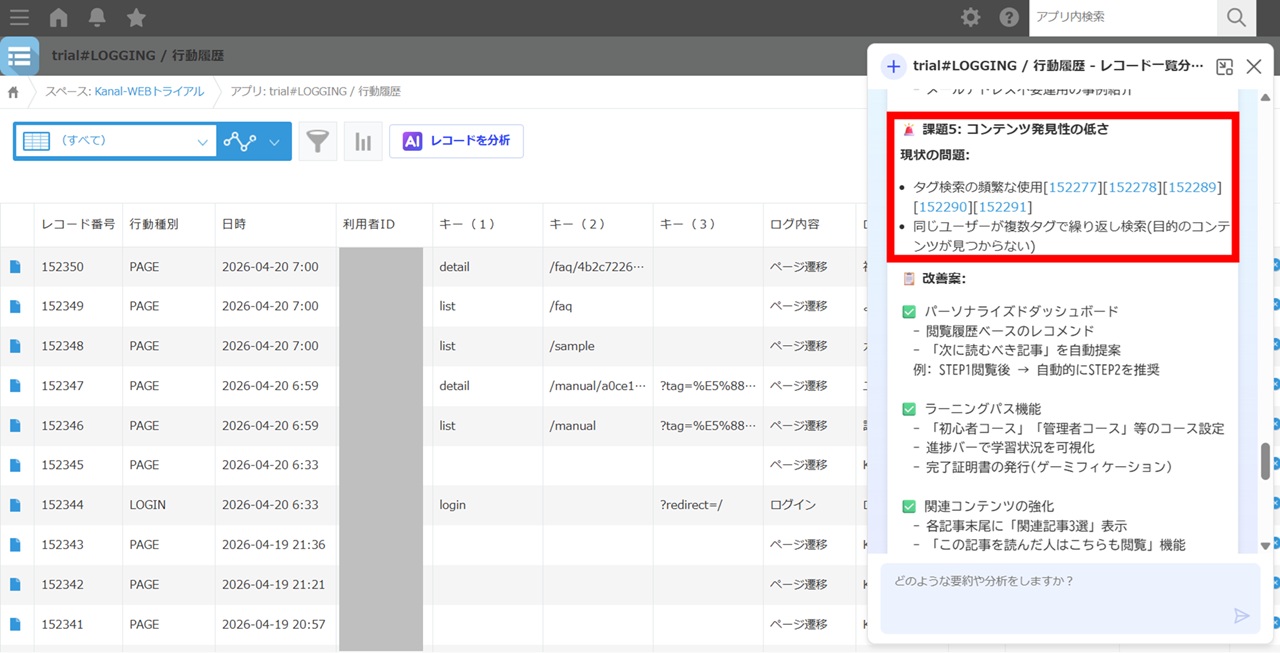
Based on viewing patterns and download activity, the AI presents the following:
- Characteristics of popular content
- Topics of high interest
- Content that needs improvement
- Specific improvement measures
All of these are presented based on the data.
Summary
kintone AI only delivers value once data has been accumulated.
Here are the key points of this article:
- Build a mechanism to capture behavior history
- Accumulate the data in kintone
- Analyze it with AI and apply the results to your work
This setup enables:
- More efficient support
- Optimized sales activities
- Improved marketing campaigns
All of this can be achieved with kintone at the center.
Recommended for
- kintone administrators who are tasked with improving operations
- Teams that want to advance data use with limited resources
- Organizations that want to drive improvements across sales, support, and marketing
Note
This architecture combines:
kintone AI × behavior history × a kintone-integrated website
It is a highly reproducible model.
Because you can adopt it in steps, starting by accumulating data and putting it to use later, it is well suited to gradual adoption.
Related articles
- Improving Support Operations and Inquiry Handling with a kintone-Integrated My Page Through Partner Collaboration
- Improving Operational Efficiency with a 20% Reduction in Inquiries
Try It on the Actual Screens
Try all features free for 30 days.